> ## Documentation Index
> Fetch the complete documentation index at: https://docs.beeble.ai/llms.txt
> Use this file to discover all available pages before exploring further.
# Canvas
> Node-graph workflow editor for final render
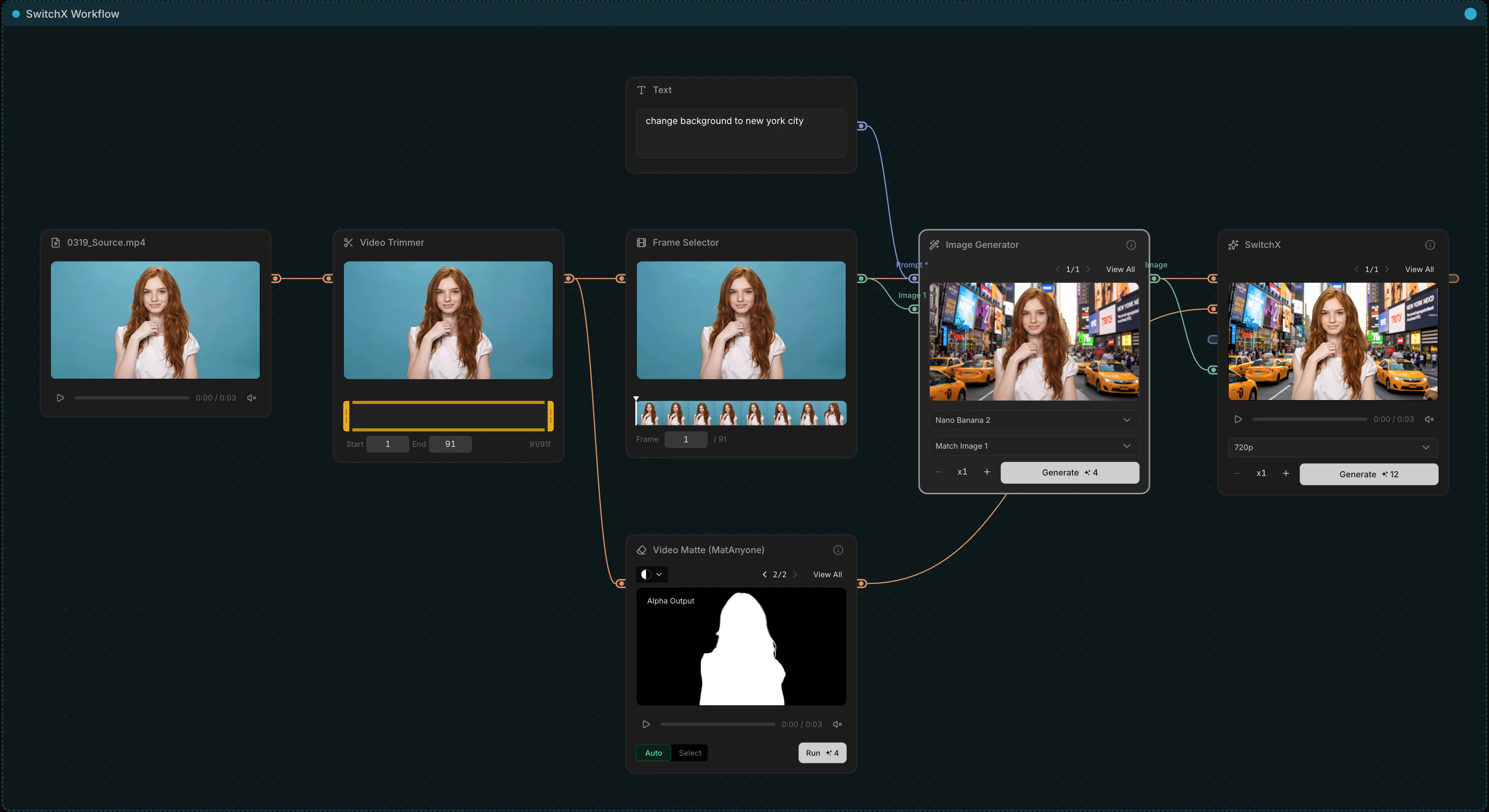 **Canvas** is a powerful node-graph editor that brings every Beeble AI model into a single, unified workspace. Build custom processing pipelines by wiring together tools like SwitchX, Image Generator, and Video Matte. Simply import your raw footage, map out your node network, and generate production-ready results. With the flexibility to branch off creative variations at any step, Canvas gives you complete control from raw input to final render.
***
## Node Catalog
Canvas ships with four node groups.
### Input
| Node | Output | Notes |
| --------- | ---------------------------------------------------------- | ------------------- |
| **Text** | text | Plain text prompt. |
| **Image** | image | PNG, JPEG, or WebP. |
| **Video** | video | MP4 or MOV. |
### AI Tools
| Node | Inputs | Output | Notes |
| ----------------------- | --------------------------------------------------------------------------------------------------------------------------------------------------------------------------------------------------------------------------------------------------------------------------------- | --------------------------------------------------------------------------------------------------------------------------- | -------------------------------------------------------------------------------------------------------------------------------------------------------------------------------------------------------------------------------------------------------------------------------------------------------------------------------------- |
| **SwitchX** | source video
**Canvas** is a powerful node-graph editor that brings every Beeble AI model into a single, unified workspace. Build custom processing pipelines by wiring together tools like SwitchX, Image Generator, and Video Matte. Simply import your raw footage, map out your node network, and generate production-ready results. With the flexibility to branch off creative variations at any step, Canvas gives you complete control from raw input to final render.
***
## Node Catalog
Canvas ships with four node groups.
### Input
| Node | Output | Notes |
| --------- | ---------------------------------------------------------- | ------------------- |
| **Text** | text | Plain text prompt. |
| **Image** | image | PNG, JPEG, or WebP. |
| **Video** | video | MP4 or MOV. |
### AI Tools
| Node | Inputs | Output | Notes |
| ----------------------- | --------------------------------------------------------------------------------------------------------------------------------------------------------------------------------------------------------------------------------------------------------------------------------- | --------------------------------------------------------------------------------------------------------------------------- | -------------------------------------------------------------------------------------------------------------------------------------------------------------------------------------------------------------------------------------------------------------------------------------------------------------------------------------- |
| **SwitchX** | source video
reference image
alpha video
prompt | video | Same model as the standalone [SwitchX](/beeble/switchx) product. Source and alpha handles are video-only. If you need Fill Mode, leave the alpha input disconnected. Set a random seed for reproducibility. |
| **LLM** | prompt
media | text | Generate text from a prompt using an LLM. Supports up to 4 media inputs (image or video). Use `@` to reference connected media in your prompt. |
| **Image Generator** | prompt
images | image | Supports 1 to 4 reference images. |
| **Video Generator** | prompt
start / end frame
reference media | video | Generate a short clip via external models (e.g., Seedance 2.0). Pick a model in the footer:- **Text-to-Video** — prompt only
- **Image-to-Video** — needs a Start Frame (End Frame optional)
- **Reference-to-Video** — up to 5 reference slots (max 3 images, max 2 videos)
|
| **Video Matte** | video | alpha
RGBA | Two outputs: **Alpha** (grayscale matte) and **RGBA** (source merged with alpha). Two modes: **Auto** (one-click) or **Select** (interactive SAM editor). Choose between **MatAnyone** (general footage) and **CorridorKey** (green-screen keys). Export the RGBA composite as MOV or a PNG sequence, and the alpha as a PNG sequence. |
| **VFX Pass Generator** | image / video | image / video × 6 | Extracts PBR material maps (BaseColor, Normal, Depth, Roughness, Specular, Metallic) from an image or video using SwitchLight 3.0. Export passes individually or all at once with **Export All**, including PNG sequences. |
| **Depth Generator** | image / video | image / video | Extracts a depth map from an image or video using Video Depth Anything. Export as a 16-bit EXR for higher-fidelity depth workflows. |
| **Video Upscaler** | video | video | Upscale a video 1×–4× (up to 4K) with Topaz Video AI. Pick a Mode in the footer (Proteus, Artemis MQ, Nyx, Gaia HQ, Starlight HQ); codec and frame interpolation live under Advanced. |
| **Image Upscaler** | image | image | Upscale an image 1×–4× (up to 8K) with Topaz Gigapixel AI. Pick a Mode in the footer (Standard V2, Low Resolution V2, CGI, High Fidelity V2, Text Refine, generative Recovery / Redefine / Wonder, and more). |
| **Image Describer** | prompt
images | text | Generate a detailed text description of connected image(s) using an LLM. Connect up to 4 images. Comes with a built-in, editable prompt — hit **Reset** to restore the default. |
| **Video Describer** | prompt
videos | text | Generate a detailed text description of connected video(s) using an LLM. Connect up to 4 videos, each up to 5 minutes. Comes with a built-in, editable prompt — hit **Reset** to restore the default. |
| **Camera Angle (Qwen)** | image | image | Re-render a still from a different camera angle. |
### Edit
| Node | Inputs | Output | Notes |
| --------------------- | --------------------------------------------------------------------------------------------------------------------------------------------------------------------------------------------------- | -------------------------------------------------------------------------------------------------------------------------- | ------------------------------------------------------------------------------------------------------------------------------------------------------------------------------------------------------ |
| **Extract Frame** | video | image | Extract a single frame from a video |
| **Trim** | video | video | Trim a video to a specific frame range |
| **Crop** | image / video | image / video | Crop an image or video. Interactive overlay or numeric inputs. |
| **Resize** | image / video | image / video | Resize an image or video to target dimensions |
| **Curves** | image / video | image / video | Adjust the tonal range with interactive RGB and per-channel (R/G/B) curves. Drag points to shape the curve; click empty space to add a point; double-click or drag a point off the graph to remove it. |
| **Invert** | image / video | image / video | Invert RGB colors of an image or video. |
| **Rotate / Flip** | image / video | image / video | Rotate an image or video in 90° increments, or flip it horizontally or vertically. |
| **Erode / Dilate** | image / video
mask | image / video | Dilate (grow) or erode (shrink) bright regions. Typically chained after Video Matte for matte cleanup. Strength ranges from −200 to +200. Optional mask input. |
| **Channels** | image / video | image / video | Isolate a single RGBA channel (R, G, B, or Alpha) and view it as grayscale. |
| **Blur** | image / video
mask | image / video | Apply a Box or Gaussian blur (Size 1–100). Optional mask input to confine the blur to specific regions. |
| **Merge** | background
foreground
mask | image / video | Composite foreground over background with 16 blend modes (Normal, Multiply, Screen, etc.). Inputs accept image or video independently. Optional grayscale mask. |
| **Merge Alpha** | RGB
alpha matte | image / video | Combine an RGB source and a grayscale alpha matte into a single RGBA stream. Both inputs accept image or video. |
| **Compositor** | layers | video | Composite multiple layers into a single video with per-layer blend modes, opacity, and timing. |
| **Paint** | image | result
mask | Freehand drawing with pen and eraser. Connect an image to paint over it, or set dimensions for a blank canvas. Outputs the painted result (RGBA) and a grayscale mask. |
| **Text Iterator** | text | text | Split text into multiple items by delimiter. Drives multi-prompt batches. |
| **Image Iterator** | images | image | Upload multiple images at once and batch-process the full set through connected nodes — no need to upload one-by-one. |
| **Video Iterator** | videos | video | Upload multiple videos at once and batch-process the full set through connected nodes — no need to upload one-by-one. |
| **Text Concatenator** | text × 2 | text | Concatenate two prompts — use one as a system prompt and the other as a user prompt. |
### Utility
| Node | Inputs | Output | Notes |
| --------------- | ----------------------------------------------------------------------------------------------------------------------- | ------ | ------------------------------------------------------------------------------------------ |
| **Sticky Note** | — | — | Sticky note for annotations |
| **Router** | any | any | Reroute connections for cleaner graphs (`.` shortcut) |
| **Viewer** | image / video | — | Display connected media at larger size with playback controls |
| **Compare** | image / video | — | Side-by-side A/B comparison |
| **Export** | image / video | — | Download connected media directly. Use the Save As dialog to choose where files are saved. |
***
## Handles & Data Types
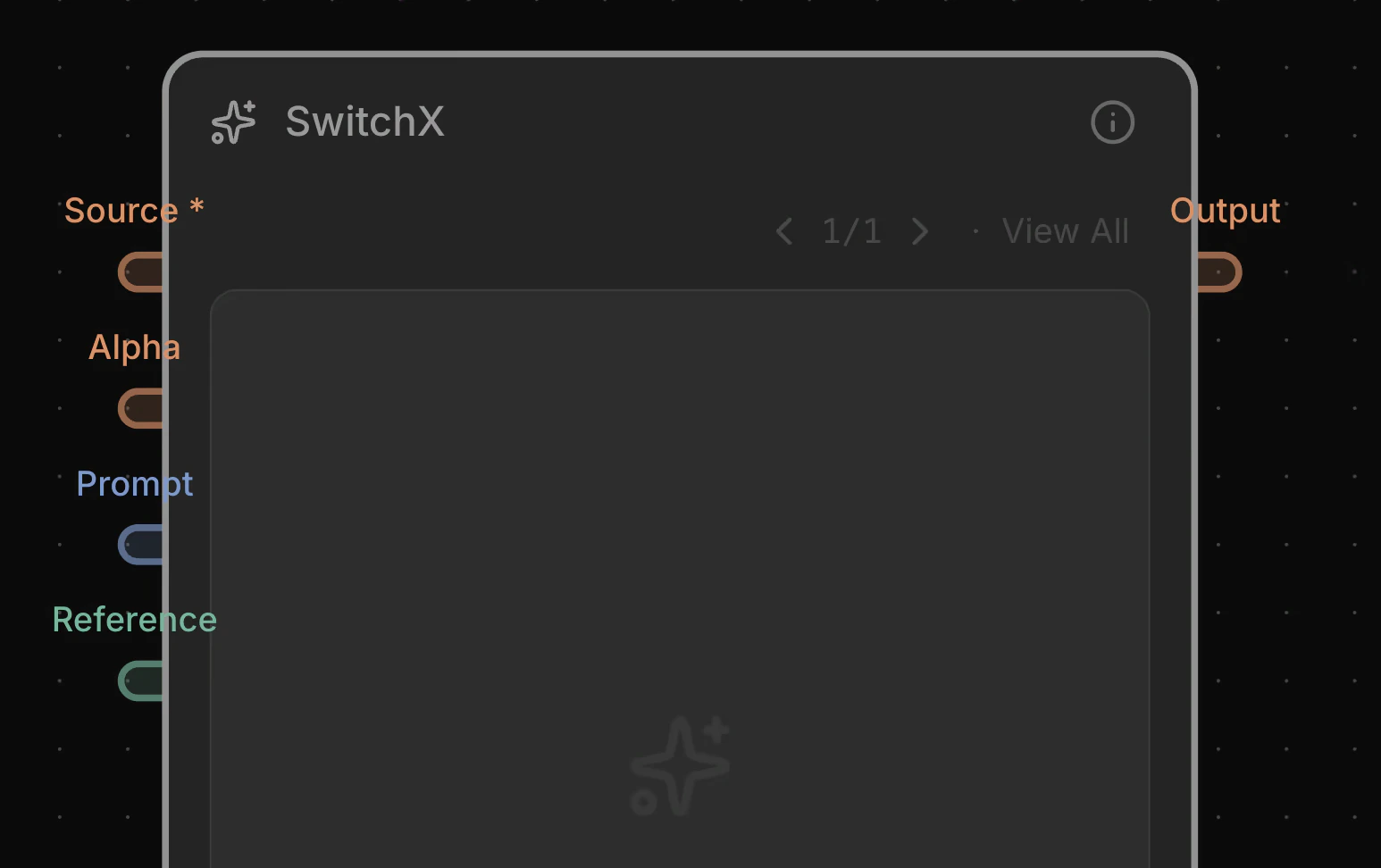
Each node's handle color represents its data type. Required inputs are marked with an asterisk on the label (e.g., `Source *`).
 ### Type colors
| Type | Color | Examples |
| --------- | ------------------------------------------------ | --------------------------------------------------- |
| **Image** | ● Green | SwitchX reference, Extract Frame output |
| **Video** | ● Orange | SwitchX source / alpha / output, Video Matte output |
| **Text** | ● Blue | LLM output, prompt inputs |
***
## Keyboard Shortcuts
### Canvas
| Shortcut | Action |
| ------------ | ----------------------------------------------------------------------------------- |
| `V` | Switch to Pointer tool |
| `H` | Switch to Hand (pan) tool |
| `/` or `Tab` | Open the Add Node menu at the cursor |
| `.` | Add a Router node at the cursor |
| `T` | Add a Sticky Note at the cursor |
| `Q` | Toggle the Job Queue panel |
| `\` | Toggle the Viewport panel |
| `1` | Connect selected node to Viewer and open Viewport |
| `Space` | Hold to pan; on selected video nodes, toggles playback (multi-select plays in sync) |
### View
| Shortcut | Action |
| ------------------------------- | --------------------- |
| `F` | Fit view to all nodes |
| `Cmd/Ctrl + 0` | Zoom to 100% |
| `Cmd/Ctrl + 1` | Fit all nodes |
| `Cmd/Ctrl + 2` | Fit selected nodes |
| `Cmd/Ctrl + =` / `Cmd/Ctrl + -` | Zoom in / out |
### Selection
| Shortcut | Action |
| ------------------------------- | -------------------------------------------------- |
| `Esc` | Deselect all nodes and edges |
| `Cmd/Ctrl + A` | Select all nodes |
| `Cmd/Ctrl + C` / `Cmd/Ctrl + V` | Copy / Paste (preserves output history) |
| `Cmd/Ctrl + Shift + V` | Paste without output history |
| `Cmd/Ctrl + D` | Duplicate selected nodes with their output content |
| `Cmd/Ctrl + G` | Group / Ungroup selected nodes |
| `Delete` / `Backspace` | Delete selected nodes and edges |
### Alignment
| Shortcut | Action |
| ------------------------ | ------------------------------------------------------- |
| `Alt/Opt + A` | Align selected nodes to the left |
| `Alt/Opt + D` | Align selected nodes to the right |
| `Alt/Opt + W` | Align selected nodes to the top |
| `Alt/Opt + S` | Align selected nodes to the bottom |
| `Alt/Opt + H` | Align selected nodes to horizontal center |
| `Alt/Opt + V` | Align selected nodes to vertical center |
| `Cmd/Ctrl + Alt/Opt + H` | Distribute selected nodes with equal horizontal spacing |
| `Cmd/Ctrl + Alt/Opt + V` | Distribute selected nodes with equal vertical spacing |
### General
| Shortcut | Action |
| --------------------------------------- | ---------------------------------- |
| `Cmd/Ctrl + S` | Save |
| `Cmd/Ctrl + Z` / `Cmd/Ctrl + Shift + Z` | Undo / Redo |
| `Cmd/Ctrl + ,` | Open Settings dialog |
| `Shift + ?` | Open the Keyboard Shortcuts dialog |
### Type colors
| Type | Color | Examples |
| --------- | ------------------------------------------------ | --------------------------------------------------- |
| **Image** | ● Green | SwitchX reference, Extract Frame output |
| **Video** | ● Orange | SwitchX source / alpha / output, Video Matte output |
| **Text** | ● Blue | LLM output, prompt inputs |
***
## Keyboard Shortcuts
### Canvas
| Shortcut | Action |
| ------------ | ----------------------------------------------------------------------------------- |
| `V` | Switch to Pointer tool |
| `H` | Switch to Hand (pan) tool |
| `/` or `Tab` | Open the Add Node menu at the cursor |
| `.` | Add a Router node at the cursor |
| `T` | Add a Sticky Note at the cursor |
| `Q` | Toggle the Job Queue panel |
| `\` | Toggle the Viewport panel |
| `1` | Connect selected node to Viewer and open Viewport |
| `Space` | Hold to pan; on selected video nodes, toggles playback (multi-select plays in sync) |
### View
| Shortcut | Action |
| ------------------------------- | --------------------- |
| `F` | Fit view to all nodes |
| `Cmd/Ctrl + 0` | Zoom to 100% |
| `Cmd/Ctrl + 1` | Fit all nodes |
| `Cmd/Ctrl + 2` | Fit selected nodes |
| `Cmd/Ctrl + =` / `Cmd/Ctrl + -` | Zoom in / out |
### Selection
| Shortcut | Action |
| ------------------------------- | -------------------------------------------------- |
| `Esc` | Deselect all nodes and edges |
| `Cmd/Ctrl + A` | Select all nodes |
| `Cmd/Ctrl + C` / `Cmd/Ctrl + V` | Copy / Paste (preserves output history) |
| `Cmd/Ctrl + Shift + V` | Paste without output history |
| `Cmd/Ctrl + D` | Duplicate selected nodes with their output content |
| `Cmd/Ctrl + G` | Group / Ungroup selected nodes |
| `Delete` / `Backspace` | Delete selected nodes and edges |
### Alignment
| Shortcut | Action |
| ------------------------ | ------------------------------------------------------- |
| `Alt/Opt + A` | Align selected nodes to the left |
| `Alt/Opt + D` | Align selected nodes to the right |
| `Alt/Opt + W` | Align selected nodes to the top |
| `Alt/Opt + S` | Align selected nodes to the bottom |
| `Alt/Opt + H` | Align selected nodes to horizontal center |
| `Alt/Opt + V` | Align selected nodes to vertical center |
| `Cmd/Ctrl + Alt/Opt + H` | Distribute selected nodes with equal horizontal spacing |
| `Cmd/Ctrl + Alt/Opt + V` | Distribute selected nodes with equal vertical spacing |
### General
| Shortcut | Action |
| --------------------------------------- | ---------------------------------- |
| `Cmd/Ctrl + S` | Save |
| `Cmd/Ctrl + Z` / `Cmd/Ctrl + Shift + Z` | Undo / Redo |
| `Cmd/Ctrl + ,` | Open Settings dialog |
| `Shift + ?` | Open the Keyboard Shortcuts dialog |