> ## Documentation Index
> Fetch the complete documentation index at: https://docs.beeble.ai/llms.txt
> Use this file to discover all available pages before exploring further.

# VFX Pass Generator

**VFX Pass Generator** uses our foundation model, [SwitchLight 3.0](https://beeble.ai/research/switchlight-3-0-is-here), to convert your footage into VFX-ready assets by generating:

* **PBR Maps:** Normal, Base color, Metallic, Roughness, Specular for relighting
* **Alpha:** foreground matte for background replacement
* **Depth Map:** For compositing and 3D integration

Your image or video becomes a **rotoscoped, relightable 2.5D asset**, ready for use in 3D Relight, Blender, Unreal or other 3D tools for further VFX work.

<Note>
  **Beeble Studio (Desktop)** processes your footage locally on your machine, no
  upload to the cloud.
</Note>

***

## Key Features

<CardGroup cols={2}>
  <Card title="PBR, Alpha & Depth Pass Generation" icon="wand-magic-sparkles">
    Powered by **SwitchLight 3.0**. Convert footage into full PBR passes with alpha and depth maps.
  </Card>

  <Card title="4K Resolution, up to 1 hour" icon="video">
    Process up to 4K resolution and one-hour videos locally on your GPU.
  </Card>

  <Card title="Image Sequence Support" icon="images">
    Upload image sequence for professional workflow. Export VFX passes as image sequence.
  </Card>

  <Card title="16-bit EXR Support" icon="file-image">
    Full 16-bit EXR input and output support for professional VFX workflows.
  </Card>

  <Card title="Unlimited Local Rendering" icon="shield-check">
    Files never leave your machine. No cloud credits used. Perfect for confidential or proprietary material.
  </Card>

  <Card title="Nuke, Blender & Unreal Engine Plugin" icon="cube">
    Direct integration plugins for seamless VFX pass import into Nuke, Blender, and Unreal Engine workflows.
  </Card>
</CardGroup>

***

## Available VFX Passes

| Pass           | Description                                   |
| -------------- | --------------------------------------------- |
| **Alpha**      | Clean background removal and matte extraction |
| **Depth**      | Normalized depth map for compositing          |
| **Normal**     | Surface normal map for realistic relighting   |
| **Base Color** | Diffuse color without lighting information    |
| **Roughness**  | Surface roughness for material properties     |
| **Specular**   | Specular highlights and reflections           |
| **Metallic**   | Metallic surface properties                   |

***

## Specifications

<Note>
  These specifications are for **Beeble Studio (Desktop)**. For cloud
  processing, see [Beeble (Cloud)](/beeble/vfx-pass-generator).
</Note>

### Import Format

<Tabs>
  <Tab title="Image Sequence">
    <div className="narrow-table">
      |                 | Beeble Studio (Desktop app)                                                                             |
      | --------------- | ------------------------------------------------------------------------------------------------------- |
      | **File Format** | EXR, PNG, JPG, JPEG                                                                                     |
      | **Resolution**  | <span style={{fontWeight: '700'}}>Up to 4K (4096 px)</span>                                             |
      | **Max Frames**  | <span style={{fontWeight: '700'}}>Up to 100,000 frames</span>                                           |
      | **Color**       | sRGB, Linear sRGB, ACEScg (Linear)                                                                      |
      | **Alpha**       | If Source Alpha option is enabled , the provided alpha in your frame will be used as the final VFX Pass |
    </div>
  </Tab>

  <Tab title="Image">
    <div className="narrow-table">
      |                 | Beeble Studio (Desktop app)                                                                             |
      | --------------- | ------------------------------------------------------------------------------------------------------- |
      | **File Format** | EXR, PNG, JPG, JPEG                                                                                     |
      | **Resolution**  | <span style={{fontWeight: '700'}}>Up to 4K (4096 px)</span>                                             |
      | **Color**       | sRGB for best quality<br />*- Other color spaces, such as Log, may degrade quality*                     |
      | **Alpha**       | If Source Alpha option is enabled , the provided alpha in your frame will be used as the final VFX Pass |
    </div>
  </Tab>

  <Tab title="Video">
    <div className="narrow-table">
      |                 | Beeble Studio (Desktop app)                                                                             |
      | --------------- | ------------------------------------------------------------------------------------------------------- |
      | **File Format** | MP4 (H.264), MOV (ProRes 422, 4444, H.265)                                                              |
      | **Resolution**  | <span style={{fontWeight: '700'}}>Up to 4K (4096 px)</span>                                             |
      | **Duration**    | <span style={{fontWeight: '700'}}>Up to 1 hour</span>                                                   |
      | **FPS**         | <span style={{fontWeight: '700'}}>Any FPS supported</span>                                              |
      | **Color**       | Rec. 709 for best quality<br />*- Other color spaces, such as Log, may degrade quality*                 |
      | **Alpha**       | If Source Alpha option is enabled , the provided alpha in your frame will be used as the final VFX Pass |
    </div>
  </Tab>
</Tabs>

### Output Format

Beeble Studio provides three output formats:

* **EXR**: 16-bit multi-layer EXR files, with each frame containing all passes.
* **PNG**: 8-bit PNG sequences for each VFX pass.
* **MP4**: 8-bit MP4 files for each VFX pass.

<Tabs>
  <Tab title="EXR">
    <div className="narrow-table">
      | Map           | Color Channels (Layer.Channel)                 | Bit Depth    | Color Space | Note                                                   |
      | ------------- | ---------------------------------------------- | ------------ | ----------- | ------------------------------------------------------ |
      | **Source**    | Source.red, Source.green, Source.blue          | 16-bit float | Linear      |                                                        |
      | **Alpha**     | Alpha.red                                      | 16-bit float | Linear      | 0.0–1.0 matte                                          |
      | **Normal**    | Normal.red, Normal.green, Normal.blue          | 16-bit float | Linear      | Object space / OpenGL normal map                       |
      | **BaseColor** | Basecolor.red, Basecolor.green, Basecolor.blue | 16-bit float | Linear      | Note: 'Basecolor' uses lowercase 'c'                   |
      | **Roughness** | Roughness.red                                  | 16-bit float | Linear      | White = Rough surface                                  |
      | **Specular**  | Specular.red                                   | 16-bit float | Linear      |                                                        |
      | **Metallic**  | Metallic.red                                   | 16-bit float | Linear      | White = Metallic surface                               |
      | **Depth**     | Depth.red                                      | 16-bit float | Linear      | Normalize depth to \[0, 1] within the foreground range |
    </div>
  </Tab>

  <Tab title="PNG">
    <div className="narrow-table">
      | Map           | Color Channels   | Bit Depth    | Color Space | Note                             |
      | ------------- | ---------------- | ------------ | ----------- | -------------------------------- |
      | **Source**    | RGB (3-ch)       | 8-bit        | sRGB        |                                  |
      | **Alpha**     | Grayscale (1-ch) | 8-bit        | —           | 0.0–1.0 matte                    |
      | **Normal**    | RGB (3-ch)       | 8-bit        | —           | Object space / OpenGL normal map |
      | **BaseColor** | RGB (3-ch)       | 8-bit        | sRGB        |                                  |
      | **Roughness** | Grayscale (1-ch) | 8-bit        | —           | White = Rough surface            |
      | **Specular**  | Grayscale (1-ch) | 8-bit        | —           |                                  |
      | **Metallic**  | Grayscale (1-ch) | 8-bit        | —           | White = Metallic surface         |
      | **Depth**     | Grayscale (1-ch) | 16-bit float | —           | **Saved as .exr** for precision  |
    </div>
  </Tab>

  <Tab title="MP4">
    <div className="narrow-table">
      | Map           | Color Channels   | Bit Depth | Color Space | Note                                                   |
      | ------------- | ---------------- | --------- | ----------- | ------------------------------------------------------ |
      | **Source**    | RGB (3-ch)       | 8-bit     | sRGB        |                                                        |
      | **Alpha**     | Grayscale (1-ch) | 8-bit     | —           | 0.0–1.0 matte                                          |
      | **Normal**    | RGB (3-ch)       | 8-bit     | —           | Object space / OpenGL normal map                       |
      | **BaseColor** | RGB (3-ch)       | 8-bit     | sRGB        |                                                        |
      | **Roughness** | Grayscale (1-ch) | 8-bit     | —           | White = Rough surface                                  |
      | **Specular**  | Grayscale (1-ch) | 8-bit     | —           |                                                        |
      | **Metallic**  | Grayscale (1-ch) | 8-bit     | —           | White = Metallic surface                               |
      | **Depth**     | Grayscale (1-ch) | 8-bit     | —           | Normalize depth to \[0, 1] within the foreground range |
    </div>
  </Tab>
</Tabs>

***

## Good vs. Bad Footage

Even though our AI models generate VFX passes from your footage—like depth, normals, or lighting layers—we don't "invent" details. The **quality of the output depends entirely on the input**. Make sure your footage contains enough visual detail by following these examples.

### ✅ Good Footage
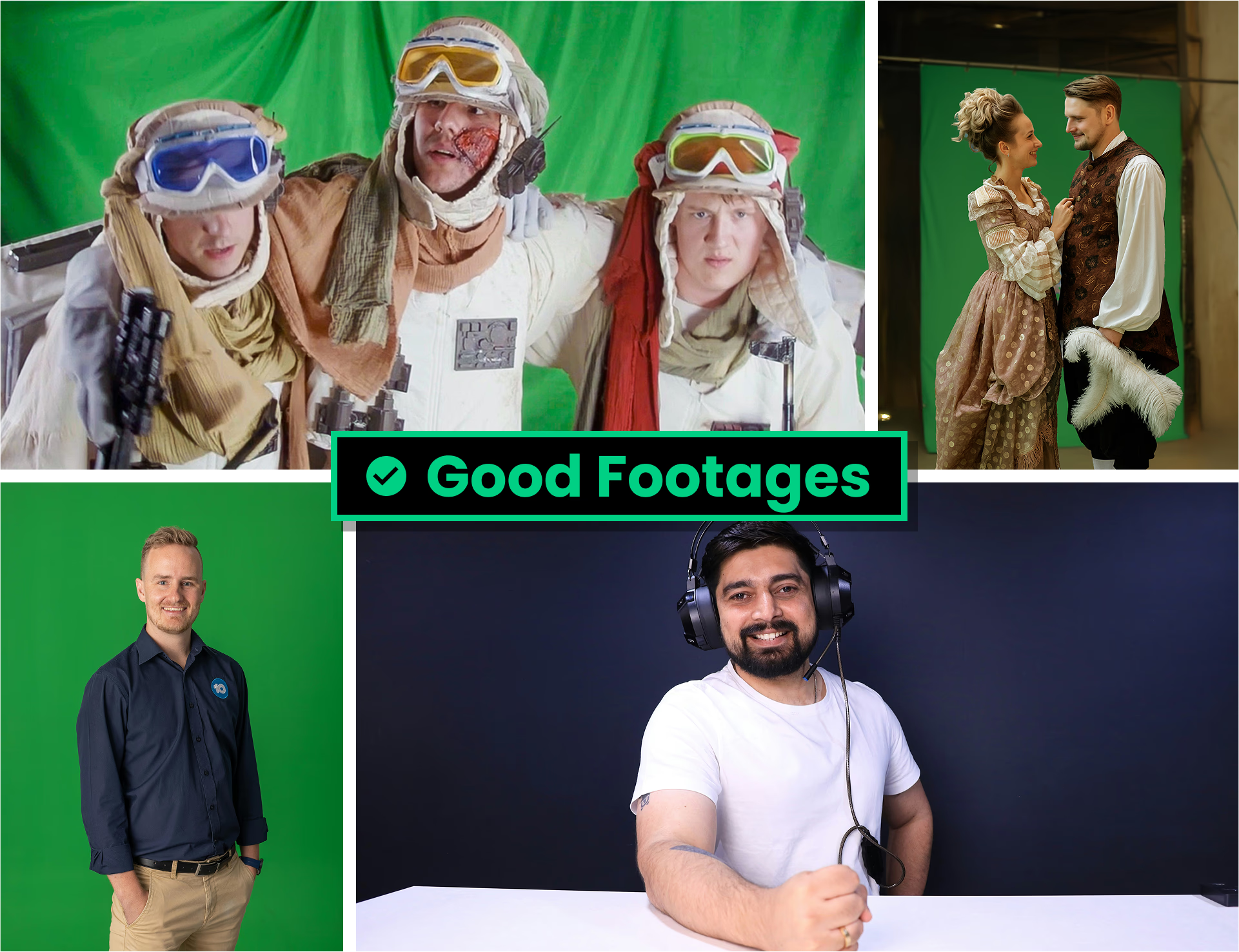
![Good footage example](https://cdn.beeble.ai/docs/good-footage.avif)

**Footage should be ready for compositing** with:

* **Includes clear subjects** – such as people or objects
* **Strong separation** between subject and background
* **High-quality** – sharp focus, high bitrate, and detailed visuals
* **Soft, even lighting** – avoid harsh shadows or blown highlights
* **Correct white balance and proper exposure**

### ❌ Bad Footage
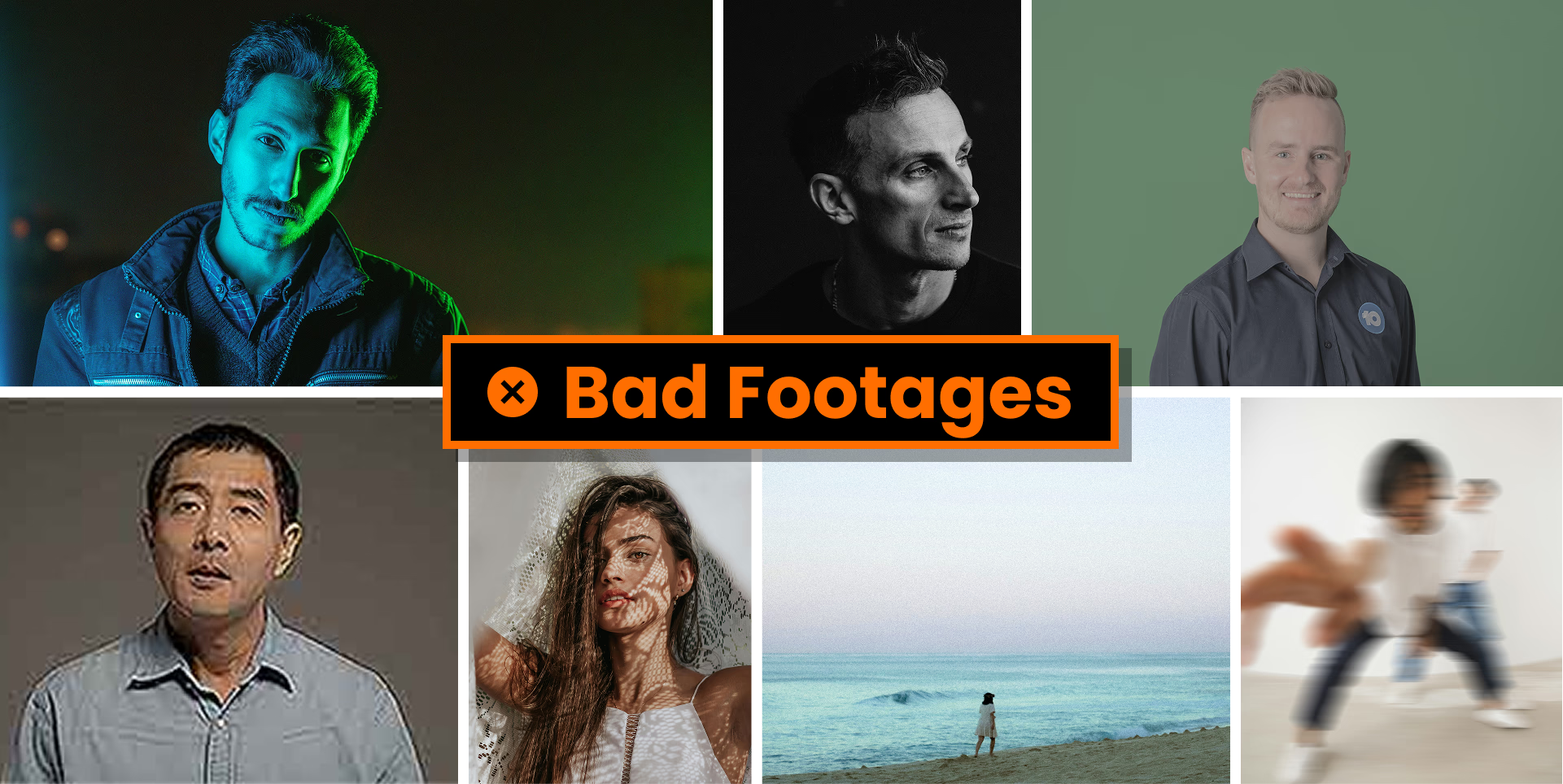
![Bad footage example](https://cdn.beeble.ai/docs/bad-footage.avif)

**Avoid footage** with these problems:

* **No visible subject**, or subject is too small in frame
* **Grayscale footage** – color is required
* **Poor quality** – low bitrate, blurry, noisy, or out of focus
* **Improper exposure** – overexposed, underexposed, or extreme contrast
* **Too much camera movement** – shaky or unstable footage is hard to work with
